Best Practices for Using Minion's Navigation Menu Features
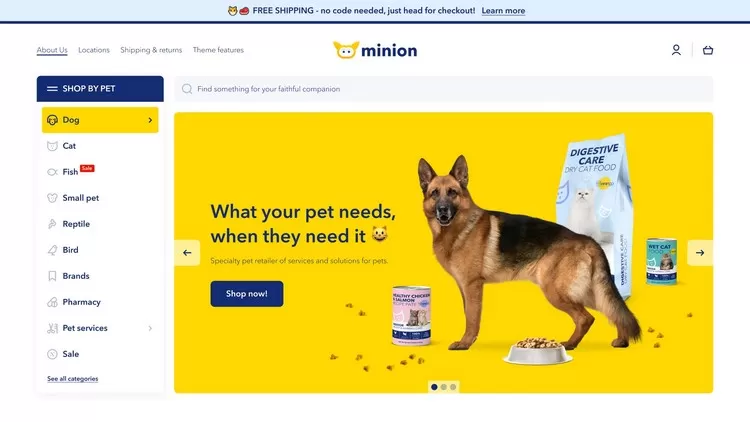
Effective navigation is a cornerstone of any successful e-commerce website. The navigation menu is often the first point of interaction between your website and potential customers. In this article, we will explore the best practices for utilizing Minion's navigation menu features to enhance user experience, improve accessibility, and drive conversions on your Shopify store.
1. Keep It Simple and Intuitive
Overview
A simple and intuitive navigation menu helps users find what they are looking for quickly and efficiently. Avoid clutter and ensure that the menu is easy to understand at a glance.
Best Practices
- Limit Menu Items: Focus on key categories and limit the number of top-level menu items to avoid overwhelming users.
- Use Clear Labels: Use descriptive and straightforward labels for each menu item. Avoid jargon or overly creative names that might confuse users.
- Hierarchy and Structure: Organize menu items in a logical hierarchy. Use submenus to categorize related items under broader categories.
2. Utilize Mega Menus for Detailed Navigation
Overview
Mega menus are large, expandable menus that display multiple options in a two-dimensional dropdown layout. They are particularly useful for stores with extensive product ranges.
Best Practices
- Group Related Items: Group similar products or categories together within the mega menu to make it easier for users to browse.
- Visual Elements: Incorporate images or icons to enhance visual appeal and help users quickly identify categories.
- Highlight Key Products: Feature top-selling or new products within the mega menu to draw attention to important items.
3. Implement Sticky Navigation
Overview
Sticky navigation menus remain fixed at the top of the screen as users scroll down the page. This ensures that the menu is always accessible, improving navigation efficiency.
Best Practices
- Keep It Minimal: Ensure the sticky menu is not too large, so it does not obstruct content on the page.
- Include Key Links: Include essential links such as home, product categories, and the shopping cart in the sticky menu.
- Consistent Design: Maintain a consistent design with the rest of your site to avoid disrupting the user experience.
4. Optimize for Mobile Users
Overview
With a significant portion of online shopping happening on mobile devices, optimizing your navigation menu for mobile users is crucial.
Best Practices
- Hamburger Menu: Use a hamburger menu icon (three horizontal lines) to hide the navigation menu on mobile devices. This saves space and declutters the interface.
- Touch-Friendly: Ensure that menu items are large enough and spaced adequately to be easily tapped on touch screens.
- Responsive Design: Use responsive design techniques to adjust the layout and behavior of the navigation menu based on the device's screen size.
5. Enhance Accessibility
Overview
Making your navigation menu accessible ensures that all users, including those with disabilities, can navigate your site effectively.
Best Practices
- Keyboard Navigation: Ensure that the navigation menu can be accessed and operated using a keyboard. Provide visible focus indicators for interactive elements.
- ARIA Labels: Use ARIA (Accessible Rich Internet Applications) labels to provide additional context to screen readers.
- Contrast and Readability: Ensure sufficient contrast between text and background colors for readability. Use legible fonts and appropriate font sizes.
6. Use Search Functionality
Overview
Incorporating a search bar in your navigation menu allows users to find specific products or information quickly, improving overall user experience.
Best Practices
- Prominent Placement: Place the search bar in a prominent location, such as the top-right corner of the navigation menu.
- Autocomplete: Implement autocomplete functionality to provide users with suggestions as they type, speeding up the search process.
- Advanced Filtering: Offer advanced search filters to help users narrow down results based on categories, price range, or other attributes.
7. Regularly Update and Test
Overview
Regular updates and testing ensure that your navigation menu remains effective and user-friendly as your product range and website evolve.
Best Practices
- A/B Testing: Conduct A/B testing to evaluate different navigation menu designs and identify the most effective layout.
- User Feedback: Collect feedback from users to understand their navigation experience and identify areas for improvement.
- Performance Monitoring: Monitor site analytics to track user behavior and adjust the navigation menu based on insights gained.
Conclusion
Utilizing Minion's navigation menu features effectively can significantly enhance the user experience on your Shopify store. By following these best practices, you can create an intuitive, accessible, and efficient navigation system that helps users find what they are looking for quickly, ultimately driving higher engagement and conversions.